Login nicht sichtbar?

Mit der folgenden Schaltfläche können Sie die Login-Anmeldemaske anzeigen und die sichere Anmeldung abschließen.

Your session is about to expire

To protect your personal data, the current content is being hidden because you have been inactive for a while. Please click "Next" to return to it.

Your session is about to expire.

To protect your personal data, the current content is being hidden because you have been inactive for a while. After 15 minutes of inactivity, you will be automatically logged out. Please click "Next" to return to it.

You have been automatically logged out.

To protect your personal data, you will be automatically logged out after 15 minutes of inactivity. Please log in again if you wish to return to your DHL customer account.

You have been automatically logged out.

To protect your personal data, you will be automatically logged out after 15 minutes of inactivity. Please log in again if you wish to return to your DHL customer account.

Your session is about to expire

To protect your personal data, the current content is being hidden because you have been inactive for a while. Please click "Next" to return to it.

Pick up parcels at the Packstation with the Post & DHL App

Packstations are becoming even easier and more convenient: From now on, we are changing the way parcels addressed directly to the Packstation are received, so that you only need to scan the new pick-up code from your smartphone to pick up the shipment. So you no longer need your DHL customer card to pick up parcels. Use the new pick-up method today by updating your Post & DHL App and carrying out the one-off smartphone activation procedure.

The benefits for you

  • Faster to the parcel - just scan the pick-up code
  • One app for everything - find all the information you need in the Post & DHL App
  • No customer card needed any more

This is how simple using the new Packstation is

  • 1. Install the app

  • 2. Activating a smartphone

  • 3. Scan the pick-up code

  • 1. Install the app

    Already got the app? Then you just need to update it.

    Use your Postnumber or e-mail address and password from your customer account to log in.
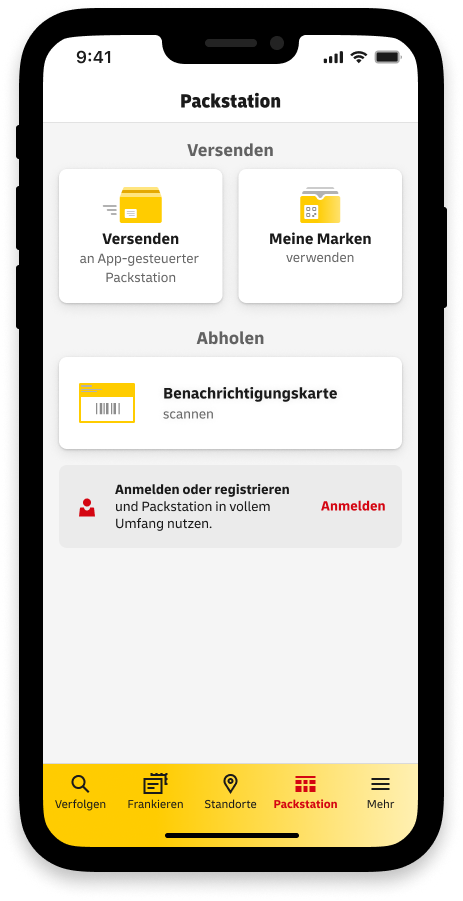
  • 2. Activating a smartphone

    In the Post & DHL App, tap the Activate button in the Packstation section.
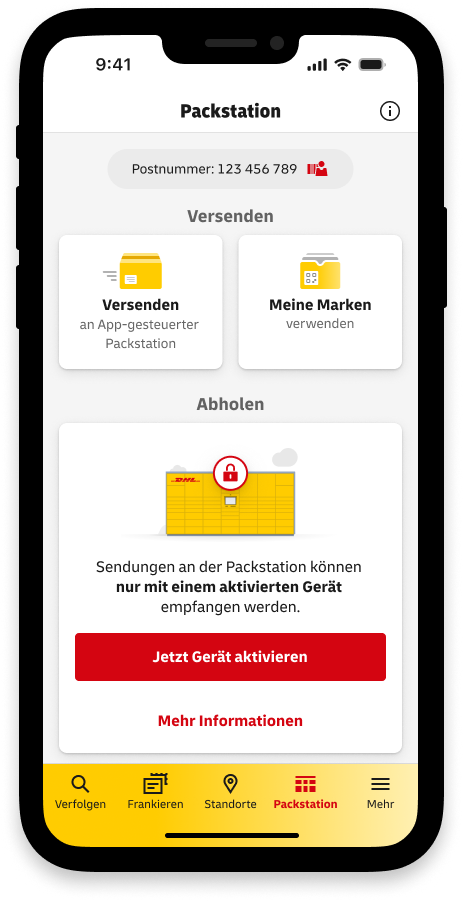
Are you using a Packstation without a display?

Then you only have to activate your smartphone once. Nothing changes for you when you collect your parcel!

Any questions?

FAQ
FAQ

DHL Group is consistently pursuing its path to become more digital.

Part of this strategy includes the upcoming changes to how the Packstation works. These changes will not only increase security for you, but also convenience when it comes to receiving parcels.

With this in mind, the development of the Post & DHL App is being continued to create a centralised channel for services around sending and receiving letters and parcels.

Is this answer helpful?

Thank you for your feedback.

Switching makes receiving goods and shipments even more convenient with the Packstation.

To pick up shipments that are addressed directly to the Packstation, all you need is your Post & DHL App. The customer card is no longer needed. Instead, the pick-up code is scanned as a QR code in the app.

Is this answer helpful?

Thank you for your feedback.

You can use the new, scannable pick-up code right away. To do this, update the Post & DHL App and enable your smartphone in the app (this is a one-off process).

As an existing Packstation customer, at the moment you can still pick up your parcels using your customer card and four-digit pick-up code at the Packstation, should you wish to. Soon, you will only be able to receive the pick-up code via the Post & DHL app. For security reasons, you will no longer receive an e-mail with your pick-up code.

Please note: As soon as you have enabled your smartphone for the scannable pick-up code, you will only be able to use the new method and will receive the pick-up code exclusively in the app, not by e-mail.

Is this answer helpful?

Thank you for your feedback.

This so‑called device activation is required once per end device (smartphone or tablet).

As a rule, device activation is performed automatically when your customer account is verified.

If you verify your customer account via POSTIDENT, device activation is carried out automatically after successfully completing the POSTIDENT process within the Post & DHL App.

If you verify your customer account via a letter, device activation takes place together with the verification of your customer account by scanning the QR code included in the letter in the Packstation section of the app.

Customers who have already verified their customer account and want to activate additional devices can log into the app with the device to be activated and click ‘Activate device now’ in the Packstation section of the app.

Is this answer helpful?

Thank you for your feedback.

First, you will need a smartphone or tablet to install the Post & DHL App.

The minimum technical requirements that your device needs to meet are as follows:

  • Android: Android version 6.0 or later, also compatible with tablets
  • iOS: Requires iOS version 12.0 or later, compatible with iPhone and iPad
Is this answer helpful?

Thank you for your feedback.

Do you have any other questions about how to use the Packstation? Help and contact